
Welcome to the guide on how to create member-specific pages and set up login redirects using Memberstack. This feature was previously known as member-specific pages.
1) Personalizing Template Pages
The first method involves using data attributes to personalize a template page for each member. This allows you to use Memberstack as the CMS for text data and links. To learn more about this method, check out our article on personalizing template pages with data attributes.
2) Creating Specific Pages
The second method is to manually or automatically create specific pages for each member. You can automate this process using webhooks, Zapier, or Make. To learn how to create specific pages for your members, follow the steps below.
Add a Member Specific Login Redirect in Memberstack
- Go to the Members page and select the member for whom you want to create a specific page.
- Scroll down and open the "Login Redirect" dropdown.
- Enter a page slug starting with "/" for the specific page. For example, you can use
/welcome/frank - Click Save, and you're done! The next time the member logs in, they will be redirected to their specific page.
Securing Member-Specific Pages
To prevent unauthorized access to member-specific pages, follow these steps:
- Make the URL unguessable to avoid other members stumbling upon it accidentally. For example, use a URL like
/welcome/frank-n2938n239un109828n. -
Add the following code before the closing </body> tag in your CMS collection or static page.
<script> const accessDeniedPath = "/access-denied"; window.$memberstackDom.getCurrentMember().then(({ data: member }) => { if (member && member.loginRedirect) { let redirectPath = member.loginRedirect; let currentPath = window.location.pathname; if (currentPath !== redirectPath) { window.location.href = redirectPath; } } else { window.location.href = accessDeniedPath; } }); </script> - Remove or modify your sitemap to prevent search engines and savvy browsers from accessing the member-specific pages. This is a best practice when using Memberstack.
- Remove any public links that point to the member-specific page.
By following these four steps, you can ensure that your member-specific pages are as secure as Google Photos!
Create a Dynamic Dashboard Button
You can use the data attribute data-ms-action="login-redirect" to create a button that dynamically redirects the user based on their login redirect. This button will only be visible when a member is logged in.
3) Using Make or Zapier
If you have automations in place to create a CMS page for each member you can use Make.com or Zapier to dynamically update a Member's login redirect on the fly. This video will explain how in under 1 minute.
Keywords: Member-specific pages, user-specific page, user-specific, member-specific
Comments
37 comments
Hi Octavian 👋 Sorry for the delay!
Can you share a link to your site for testing? I have a feeling the issue is timing... odds are good Memberstack is faster than Make/Zapier. If you add a button with the attribute data-ms-action="login-redirect" and click it after login does it work? If yes, then you'll need to direct users to a generic "welcome" page which is the same for all members and ask Members to click a button to "Access your unique page."
Hi Duncan, thank you for replying!
Here is the link to my page. Just go through the form selecting random answers. Also, here is my Webflow read-only.
What I'm trying to achieve through Make is the following: after the user has answered the questions and submitted the form, he should be redirected to a page where it dinamically shows him a final score calculated from his answers.
Here are my steps in Make (i'm also attaching a screenshot from Make)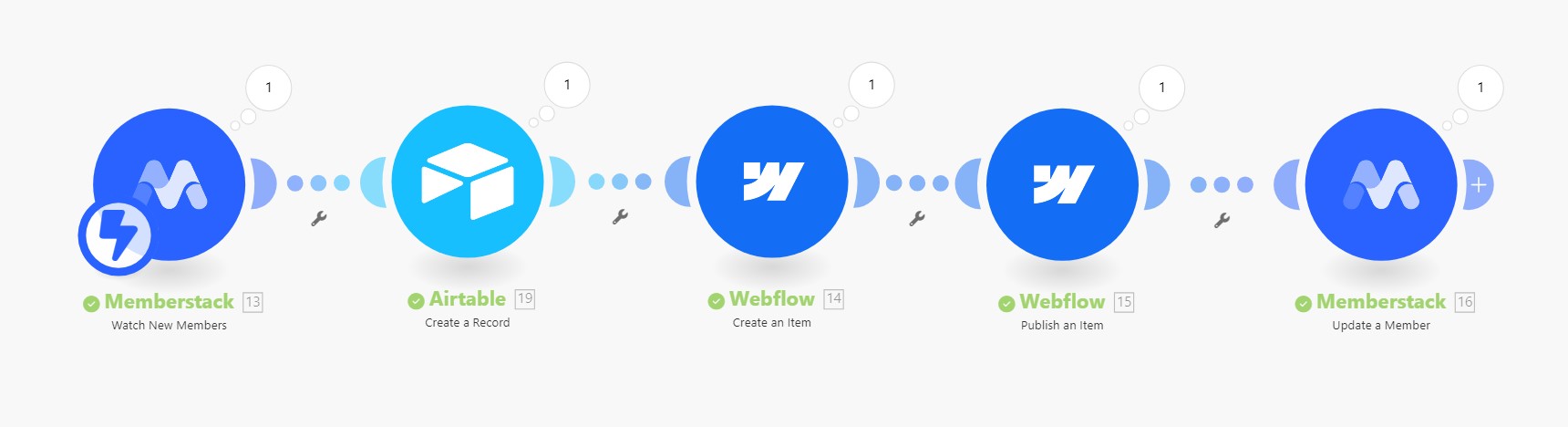
1. Watch out for new members in Memberstack.
2. Send data from Memberstack to Airtable and do some calculations and get final score.
3. Send data from Airtable to Webflow and create a new CMS item.
4. Publish CMS item.
5. Update member in Memberflow with resulting calculations from Airtable and add login redirect to page that has the Webflow slug from CMS.
To answer your question:
If I add data-ms-action="login-redirect" to my Submit button at the end of the form the button dissapears.
I get it that Memberflow is faster than Make and until Make goes through all the steps, after you push the submit button, Memberstack doesn't yet have the login-redirect link. What I was thinking was having a loading page where it simulates "calculating the score" for about 5-10 seconds until Make has the time to update everything and then redirect automatically to the page where it dinamically displays the final score. But I have no idea how I could achieve that.
Let me know if it all makes sense and I look forward to any input you mightb have on this.
Thanks a bunch!
One more thing: I’ve also tried just adding a signup redirect on the plan level in Memberstack and it works (without the dynamic slug) albeit with a delay in updating the results dynamicaly, but I’m sure I can get around that with a “loading results” page. The only problem with this workaround is that the redirected page is not unique to the member that is signing-up (I want to be able to have member specific pages - like a dashboard).
Hi Duncan from Memberstack,.
Did you have a chance to look over what I sent?
Thanks!
Hey Octavian 👋
I think you've just about got it! One suggestion after chatting it over with ChatGPT. What if you use the members login redirect for the delayed redirect? It should pull from the plan or from that particular members login redirect.
Hi @Duncan from Memberstack,
Thank you for your reply!
At the moment I’m on summer break but will look over your suggestion next Monday.
Best,
Octavian
@Duncan I’ve managed to fix it through webhook response in Make. Thanks a lot for help and availability!
Please sign in to leave a comment.