Hey guys, I’m having trouble applying a coupon code at checkout for my product. I tried setting it to 100% off, but it doesn’t seem to work. I’ve created the coupon correctly in Stripe, but it’s not applying during checkout.
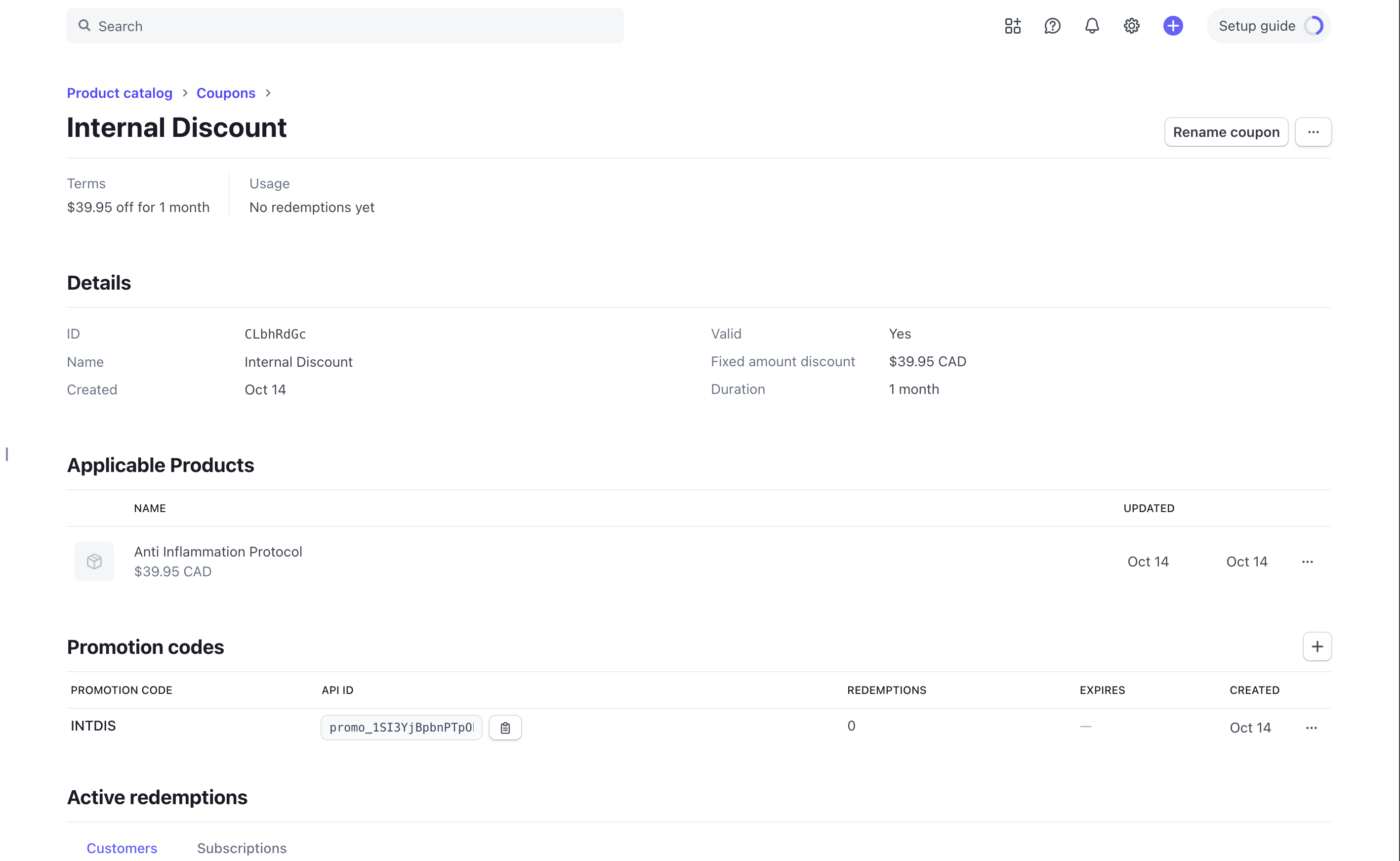


Hey guys, I’m having trouble applying a coupon code at checkout for my product. I tried setting it to 100% off, but it doesn’t seem to work. I’ve created the coupon correctly in Stripe, but it’s not applying during checkout.
15 comments
Hey ilyas el megarbi,
Can you ensure that you have not enabled / are following the restrictions enabled (if any) while creating the coupon code? (restriction list shown in 1st screenshot). Here is a known limitation for coupons.
Just for testing purpose, can you create a coupon with 100% off and not a fixed amount discount and check if that gives you any result?
If that does not work can you share the site link where I can attempt purchasing this product so that I can troubleshoot this in a better way?
A J even with 100% off discount the coupon doesn't work as you can see below is the link to test it out
https://get.glori.io/full-funnel-template-pages/sales-page-template
Here is the coupon code INT100
Hey for those of us using Memberstack with Stripe do we have any control over the checkout session that gets created? I'm having issues creating a 100% discount code when importing my plan with Stripe. Per Stripe support everything is set up correctly on their end but they need to see how the checkout is being generated via Memberstack.
Is there a way to get the memberstack server side request to Stripe?
It seems Memberstack is really only using the priceId from Stripe and not the productId.... so this causes issues when doing an integration without an outside SDK. The 100% discount won't apply to the Stripe product... I suspect because of how the checkout session is being initiated but I can't seem to find any Memberstack logs to indicate that. Any help would super appreciated.
ilyas el megarbi I'm actually having the same exact issue. What does the network tab say in the response when you apply the code? Are you getting a
promotion_code_amount_too_smallresponse? This means Stripe is expecting there to be a minimum transaction amount based on the currency that you are paying with... Super annoying and this worked with memberstack a little over a month ago with no issue....Error Response you may be getting:
Hey Allen Dzedzy,
Here's an article on ways to apply coupon on checkout automatically. Does this help your use-case?
That being said, here's the developer docs to explore how we can launch a stripe checkout with coupon codes if we want as well. It's under 'Purchase plans with checkout' section.
Let me know if you mean something else or want to solve some other use-case.
Allen Dzedzy i don't know how to find it in the console, can you test using the link above with the promo code of INT100
The issue is we are doing this without any server side functions. This is all being handled between MS & Stripe's API's and we are not calling the checkout directly. A J
sure
ilyas el megarbi Where is the payment option on this page? I cannot find the link to the screenshot you shared above
ilyas el megarbi, you can double-check if the correct applicable product is selected for the coupon code in Stripe. i.e. the subscription that is linked with Memberstack and it is not linked to some other duplicate product. But I believe you have linked the right one.
That being said, Allen Dzedzy and ilyas el megarbi, does it help if you enable 'No-cost orders' in Stripe settings (as highlighted in the screenshot below).
You can find this by clicking Stripe settings (gear icon) in the top right menu --> Payments --> Enable No-Cost orders.
Hope this helps.
I don't have that option with Stripe which is why I'm having this issue as well.
Yes the same thing for me as well, don't have the Option in Stripe
Allen Dzedzy, oh I see, did Stripe support mention why the setting is not available in Stripe dashboard? Curious to know what could be the scenarios where Stripe dashboard does not show this setting.
That being said Chukwudi Josh Lopez, do you have any insights on why this might be happening? 🤔
I believe Stripe mentions to use API version 2023-08-16 or later to allow no-cost orders using the Checkout Sessions API. Is that the case when we launch the checkout session via Memberstack?
Since Allen Dzedzy mentioned this 100% off flow was working a month before, are there any changes made in this aspect?
I'm on the latest Stripe API version which is 2025-09-30.clover, when this worked previously for me I was on 2025-06-30.basil. Seems like there was either a change or regression on MS side when creating the checkout session (can't confirm though)
It's the same issue with either API version. But I have a transaction record of this working back in September via Stripe. Suddenly it no longer works. However if you create a Payment Link via Stripe everything works fine. It's specific to importing the product into Memberstack and going through the checkout flow that MS instantiates. Trying to resolve this for a client that does not want to use serverless functions.
I was simulating a checkout session via Stripe API and my test account and it does work if I apply the coupon code directly in the API request without any issues.
I also remember 100% off codes working for my clients in the past with Memberstack and Stripe setup.
Memberstack team could probably have more insights as to what and where the issue might be 🤔 cc: Duncan Hamra
Hello everyone,
We’re currently investigating this issue. Since we haven’t made any changes to Stripe in a while, my best guess is that Stripe has updated something. Our development team is currently busy and will address this matter as soon as they can.
Figured there was some form of API change made to cause the regression.
I have submitted the bug report and I got word from the dev team. This should be fixed now!
Now It's working, thanks a lot
Can confirm! It's fixed! Thank you Josh Lopez & A J !
Please sign in to leave a comment.