
Hey! I have an onboarding form, and on that form, I copied the address autocomplete form. I followed all the directions and pasted the code, API key, etc. Could someone help me find the issue? I can't seem to resolve it.
Could it be that I changed the form attribute to this?
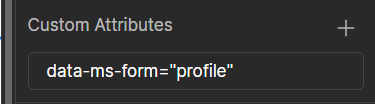
Bc I want the fields to update the profile... It was set to file upload when I copied it for some reason.
2 comments
Hello Daniel,
Could you share a link to your site to look at the issue?
I'm not sure where you copied the components. But recently a user had a little issue with the Memberscript for the autocomplete address component. You can take a look at the conversation to find the solution
If you want the form to update custom fields for your users, each field should have the attribute data-ms-member="FIELD ID" and the Webflow form should have the data-ms-form="profile"
File upload is a type of input, and if the form have something related to file upload it could be to upload a file to a different server... maybe related to a different memberscript.
You can use one of the profile forms Memberstack has as a reference or copy paste them in your webflow project so they work. For example this one but you can find more in the components sections of your memberstack dashboard.
Resolved! Chat GPT fixed it 🙂
Please sign in to leave a comment.