
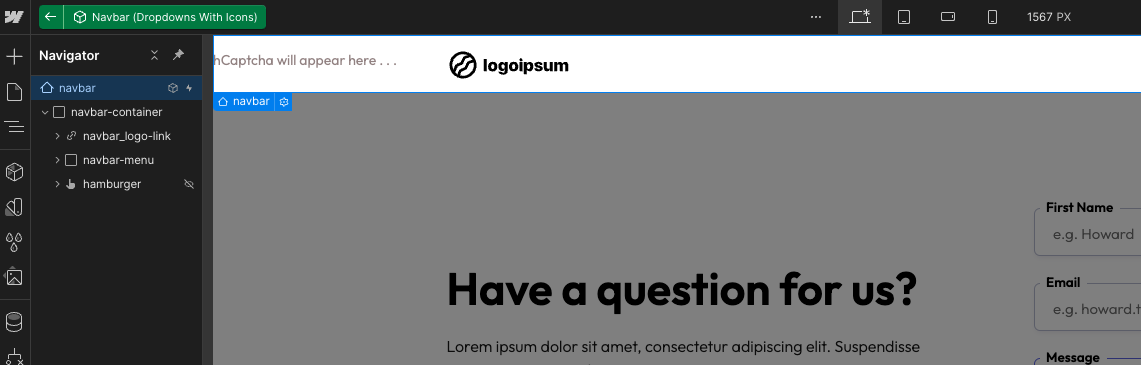
Building out a sure using the Generic SaaS template and when dropping in a nav bar component it is showing 'hCaptcha will appear here...' why would this show in a navbar?
MS SaaS template - https://app.memberstack.com/apps/app_clr3q2pmb00bj0trm6irfakao/editor
9 comments
Hey Graham Ferguson! It seems like the wrapper of the hcaptcha element isn't set to relative, so its just going to the top of the page. If you can send a read only link, I'll show you what to do 🙂
Here you go Julian Galluzzo https://preview.webflow.com/preview/inprogress-3f5a2c?utm_medium=preview_link&utm_sour[…]bc4a3363de&pageId=659d63cb1425b61d5b9ce941&workflow=preview
I only dropped in three components so not sure if there is an error somewhere
There it is! If you delete this element, all will work as it should 🙂
You can see it here in the navigator
Got it thanks! I'm guessing that isn't meant to be in the component Julian Galluzzo?
Nope! Thats a mistake, most likely on my end 🙂
Does the Memberstack code call an hcaptcha api on page load?
Once MS is loaded, hcaptcha is loaded. It's an async request so won't slow down your initial page load.
Hi im currently trying to enable HCaptcha in my custom log-in form. But it doesnt seem to appear when i publish my site in webflow. It works for the sign-up page. Do you guys have any ideas on what the issue could be?
Hey Alpha Extract, I tried to implement a pre-built hCaptcha component on a login form but it does not show-up 🤔
I think currently it only works for a signup form and personally I think hcaptcha is more effective on sign up forms from a security standpoint than on login forms, since adding this might hamper the login experience without really adding on much security aspect, since we already have hcaptcha enabled and compulsory during sign-ups and also have the option to disable concurrent logins for ensuring multiple people can't login using the same account.
Please sign in to leave a comment.