
I'd love some advice, this is my first time building anything close to SaaS, so this is very much a new problem for me.
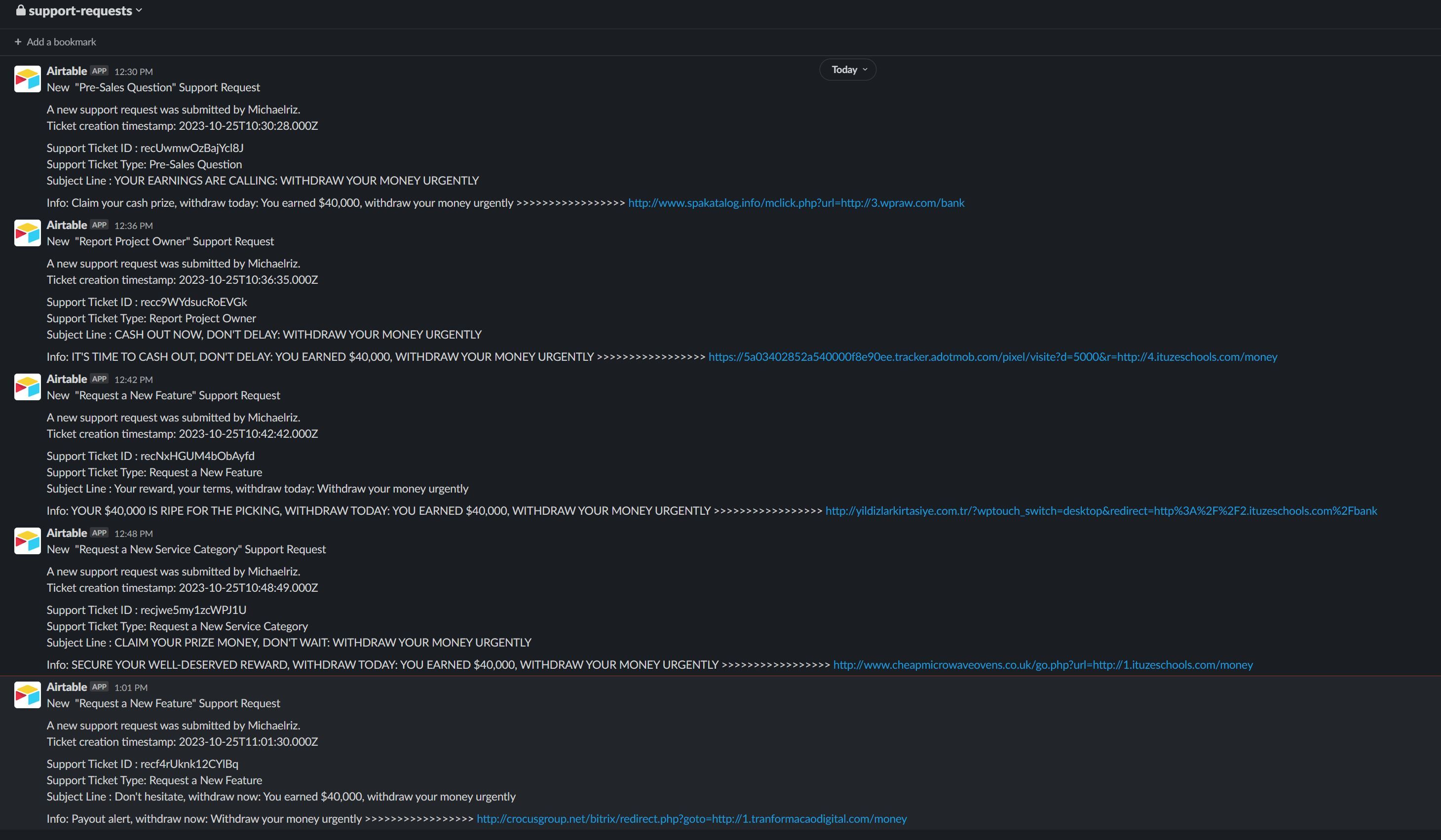
Do you guys have any suggestions/advice on how to handle spam/scam support requests such as this?
For now, since they keep using the same keywords in all their support requests, I've added a filter "You earned $40,000" to help filter out the this specific spam/scam, though that's not viable at scale for these kinds of issues.
10 comments
Have you tried using a captcha in the forms? You can find a lot of information online to get security tips to avoid spamming
https://www.nutshell.com/blog/8-ways-to-combat-form-spam
My god.... I cannot believe I forgot captcha.....
Raquel Lopez Thank you so much!!!
This has undoubtedly fixed the main issue at hand 🙂
This dude actually passed catpcha........... Im at a loss for words now lol
There are other options in the article I shared, you don't necessarily need to stick to only one solution. The more layers of security you add the more difficult will be for the bot to send requests. If you're using Make for example, to integrate your form with Airtable, every request counts towards your plan limit, so that could potentially add up to your final cost of the platform.
My advice is for you to add a couple more blockers, like the honeypot method or asking questions, those are the easiest to implement for a form. You can also get more creative and add a logic for example if the user is not logged in it can only send one form submission per session or per cookie or per day. If is logged in then we'll asume the user validated the email on sign up, and you can allow it to send more support tickets... that's up to you and what will it work for your business
I’ll spend today exploring all options listed in the article your shared with me :)
Thanks again!
I've implemented a few of these, and only just now noticed that webflow allows forms to submit even without the captcha checked 😮
Is this normal behavior when using forms with webhooks?
Did you generate the api keys like they said in their docs?
And once you enable them you need to use recaptcha in all forms
Form shouldn't submit. Webhook triggers after a form submission 😕
yup, I did generate the API keys, added it to webflows forms, enabled it in webflow forms section too, as well as made sure it was the correct version (v2 checkbox). I've only added reCaptcha to the support form for now, but from my understanding forms wouldnt work without reCAPTCHA, which was fine for now as we aren't publicly available at the moment.
Though if its possible this form's reCAPTCHA isnt working because other forms dont have reCAPTCHA then I'll try adding it to all forms for now and see if that fixes things 🙂
Raquel Lopez Webflow support informed me that using webhooks with forms circumvents their reCAPTCHA setup, so I have to build my own for webhook forms apparently 😞
Just checking, you're using Webflow's Webhook to pull data, right? To what service you're integrating it to? Are you using Make?
No data is being pulled, I'm using a make generated webhook to grab form submissions and generate CMS items out of them, or in this case to create an airtable record. The form is set to POST method along with the make.com webhook 🙂
You have 2 options using Make
If it works you should filter the form by name, because you will get all form data 😅 It's just an alternative before trying custom code solutions
I also could consider another option, that is to handle the form submission using custom code... It would be like a bypass. On submit you can send the data to the Make's webhook URL.
$("#YourFormId").on("submit", async function (ev) {
  ev.preventDefault();
  // POST your data to Make

  return false; // Webflow won't send form submission
});
These are alternatives I consider based on the premise that the action should be empty so the reCaptcha handles the form submission. Would have to debug to be certain but I hope gave you some ideas 🤔
My concern with the form submission and a watch event is the Webflow form submission limits, does that not apply when submitting a form to make via the Webflow watch form submission event? Maybe I misunderstood the limitation
For now I’ve actually got it working by switching to hCAPTCHA and then adding a script to page to disable the submit button on the form till the hCAPTCHA returns a value (which only happens on successful hCAPTCHA completions)
Granted, I think you can just go into the html and enable the button, and truthfully I’m not too sure if this helps against spam at all.
But here’s the code I ended up using
Kind of a wishlist item;
Please sign in to leave a comment.