
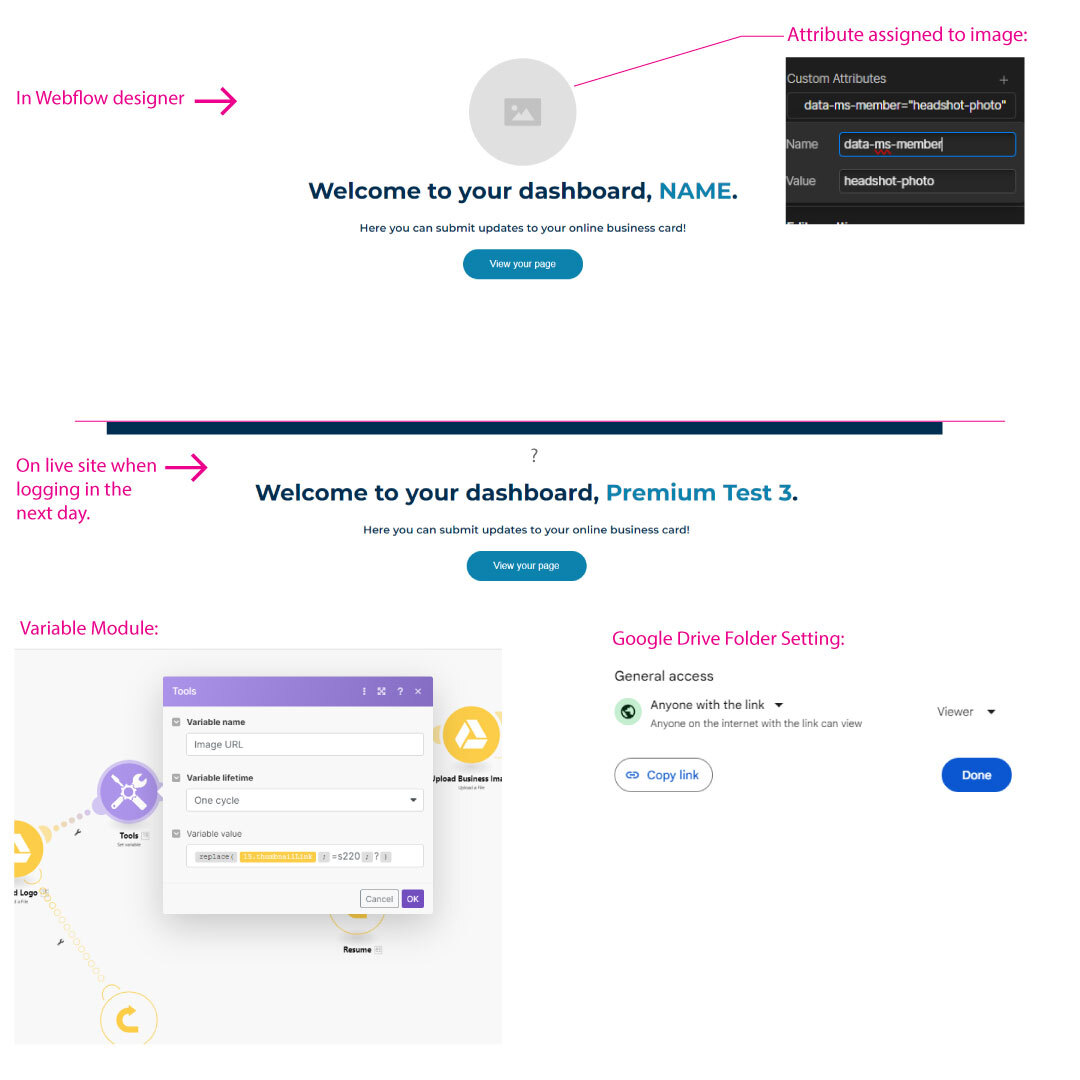
Hello Everyone! I am still having the issue of images not showing on user dashboards. When I create a profile and add images, it works fine. But it seems to happen the next day when I log in to the same user dashboard. I am using a scenario in MAKE.com for uploading to a Google Drive folder. In the scenario, I have a module that grabs a thumbnail link to pass into Memberstack & Webflow. Here is a link example: https://lh3.googleusercontent.com/drive-storage/AKHj6E5EtJgCodC_Yy-O6QBxuf3JWeG_IwB0W5IXgS_-DeXDJwe0tnD_YqA5pkBpIHlm57mFuyS8f3DHQcIVQJa9ft3aSAJDQ-Lt94EnSE5z? I also believe I have the Google Drive folder set to "anyone with link can view". Any help is greatly appreciated!
10 comments
2 things:
this is what i get when i try to go to the image url you provided. This is probably the issue.
Hi, Julian Galluzzo I am actually using a couple of fields for images, not just for the profile image. For example, users can upload their logo and a background image. Also, I did input the upload code. I was going off of this video: https://support.memberstack.com/hc/en-us/articles/4409152207387-Upload-images-using-Webflow . I didn't use the native Webflow uploader because the links were not working, so I used the Memberstack uploader. It was working great then it seems after a day or so, the images do not show. This is the last feature I need to work and I am ready to launch.
Hey, Josh Lopez yes, I thought maybe I had the Google Drive folder set to private, but it wasn't. It's kinda weird because I got the error even when the images were showing.
Vincent Torquato I believe those google drive links are temporary, hence why you see them right away and then they disappear - I usually use them to get an image from a user into the Webflow CMS, then I use the more reliable webflow hosted link to actually serve the image
Julian Galluzzo Ohh, Ok. So, from the Memberstack module in Make, I should grab the link input from the Webflow module instead of the Webhook, correct?
Yes I believe so!
🙌 WooHoo!! It worked!! Thank you for all the help and work you've put in Julian Galluzzo!
No problem at all Vincent Torquato!!
Guys, how do I solve the IMAGES NOT LOADING by default on emails sent by Memberstack. I verified our domain, so I am not sure why this still happens. A J Chukwudi any ideas?
Hey Fernando Azevedo Pinheiro, is it appearing all of a sudden now?
Upon some research, I found that once you build the sender email reputation, i.e. by sending trustworthy emails to recipients, gradually the sender reputation score also starts accumulating and gmail won't impose such warnings. Also found if tracking pixel is enabled, this might occur, but I was testing this and I was not able to find any such tracking pixel which might have caused this warning message 🤔
Please sign in to leave a comment.