
Hello! I have a question about the email verification feature.
We need to launch a landing page with a button that leads to signing up for a monthly plan (like a pricing table button), and we need to verify users email before they are able to pay, because we want to make sure only real emails from users are used in the platform.
We enabled the toggle switch "Require verification to complete signup" (see image below), with a redirection to a page to bring information about the verification.
Right now, we need to verify users email first, BEFORE it allows them to pay in Stripe, but after signing up our users get their Verification Link email, but they are redirected to Stripe platform and are allowed to pay without verification.
Is there a way to achieve this? I leave an image example of what we need.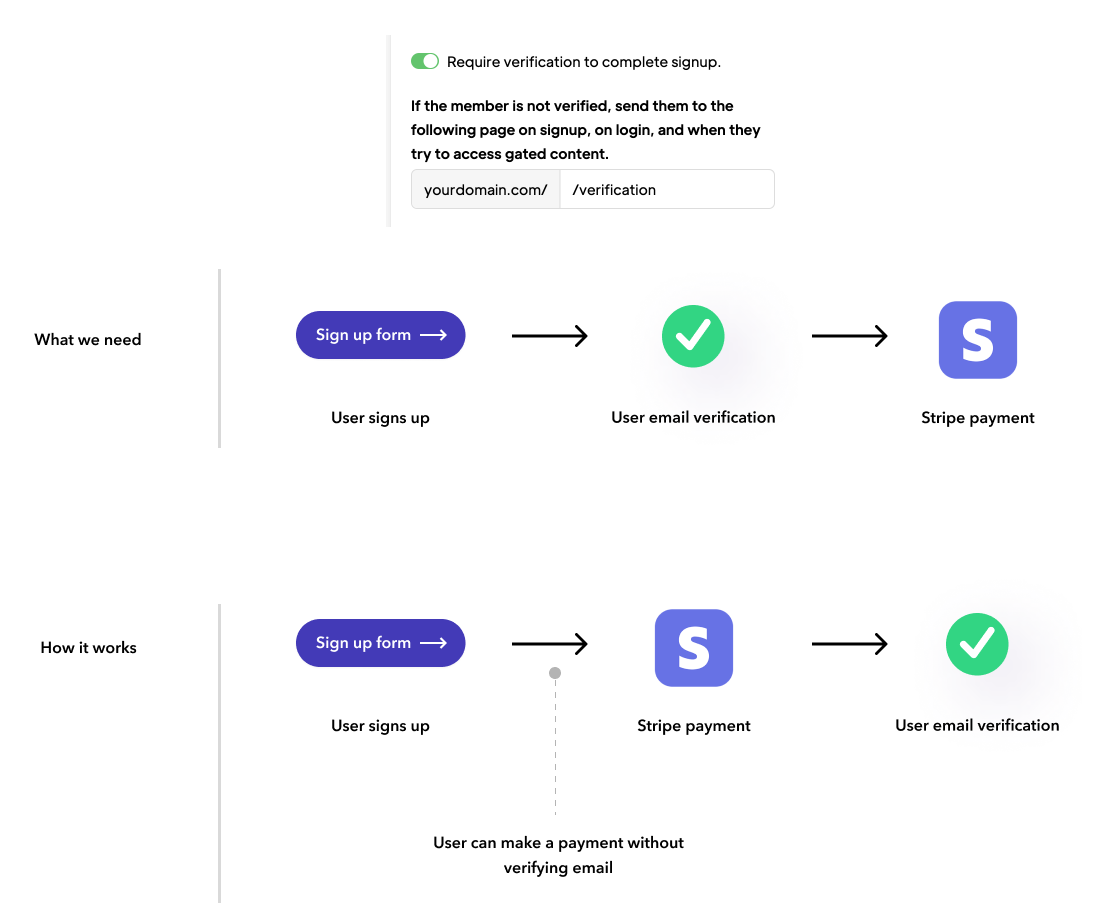
10 comments
Hey Juanca López
Excellent inquiry. To achieve this, users must first register as members. Once they are members, the plan button will only be displayed to those who have been verified. This is accomplished by using the data attribute
data-ms-content="verified", which ensures that the button is visible exclusively to verified members.Thank you Josh Lopez! Thought about that solution, but we wanted it to work in a landing page that is going to be only for new visitors and help them become members/subscribe to a monthly plan in that section.
So, we needed: visit landing page > Click on button > Sign up form > Verify user > Redirect to Stripe payment.
Hello again,
Thank you for reaching out and sharing your vision for the landing page. I understand your goal to streamline the process for new visitors to become subscribers through a specific flow: landing on the page, clicking a button, filling out a sign-up form, verifying their user status, and then proceeding to Stripe for payment.
Currently, our platform is optimized for a slightly different approach, primarily due to our experience with user behavior. We've noticed that many users often delay or overlook the account verification step. To address this, our system encourages users to complete the payment first, as we've found that paying members are generally more committed and therefore more likely to complete the verification process at their convenience. This approach also helps in reducing friction at the initial stages of engagement.
While this means that the exact flow you're envisioning isn't directly supported at the moment, I can certainly appreciate the value in such a streamlined process, especially for first-time visitors. I will pass along your feedback to our development team, as understanding your needs helps us continuously improve our platform. Meanwhile, please add your idea to our Product Wishlist so others can add their feedback.
Thank you Josh Lopez for your response! We'll make it work with the features available at the moment, and thank you for considering this in your process 🙌🏻
Hi guys, I am having exactly same issue/requirement.
So there is no way I can use plan redirects or some other settings/script to pass the purchase price (ms_cart) to Stripe checkout AFTER the verification process is complete?
Thanks, Petr
Members get verification required email to verify their email after signing up even before their payment is completed on Paid plans.
Signup goes to stripe checkout. While the user is filling the stripe checkout page, An email has already been sent to them for them to verify their email even before completing their payment.
https://www.loom.com/share/93851a8b814f444dac402ed9cc6a2f6c
Okay, thank you.
Can you direct me to a resource that lets them upgrade their plan in a case like this. So they already have an account but haven't paid.
How can the login and upgrade their account. Duncan Hamra
Very cool product by the way!
And when it comes to upgrading Memberstack will automatically lauch the checkout if the customers goes 1) select price 2) tries to sign up but already has an account. 3) logs in - the checkout will open.
They can also log in and then click on any of the pricing buttons on your site to launch the checkout. I recommend setting your "default login" and "default signup" to be your pricing page. That way new members (who don't have any paid plans) will be redirected directly to the pricing page. And then you can set plan specific redirects on each of your paid plans. https://docs.memberstack.com/hc/en-us/articles/7384608370715
Hope that makes sense... If you have any questions please let me know!
Michael Ola, to add-on to what Duncan said above, in case users opt for checkout but don't complete the flow, in such cases, you could urge them to complete the checkout by adding Checkout UI notification as guided here. Hope this helps.
Please sign in to leave a comment.