
Hello together,
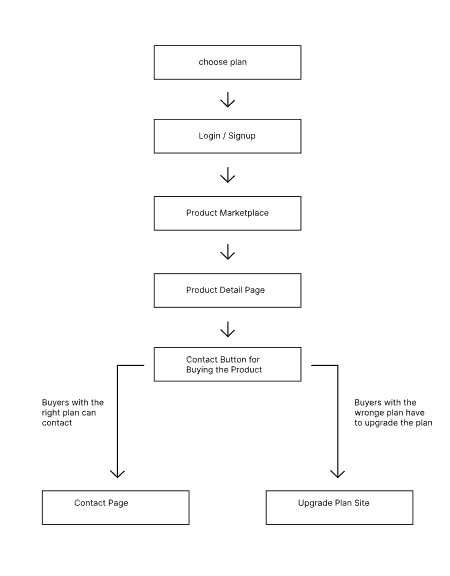
I have a question regarding a workflow I implemented with Memberstack and Webflow. I would like to sell several of my products via a marketplace. Everyone should be able to access this. Everyone should also have access to the product details. On the product detail page there should be a button that leads to a contact form where the interested customer can request the product, but only if he has subscribed to the right plan. Now my question, is it possible to give the button certain attributes, so that only if the customer has the right plan, he will get to the contact page and if he does not have the right plan, he will get to an upgrade plan page. Attached is a PDF where I show how the flow should be, so that it is more understandable.
I hope someone can help me and tell me what exactly I can do to make it work like this, or if it can work like this at all.
Best regards
Gerry
7 comments
Hey Gerry!
This is indeed possible - what you will want is the following:
Hello Julian!
Thank you very much for the quick feedback. So if I understood correctly, the member who is registered with the correct plan will see the contact button and the member who is registered with the wrong plan will see the upgrade plan button? Where can I find these attributes? Are they from Webflow or from Memberstack?
Correct! And they are from Memberstack - here https://www.memberstack.com/data-attributes
Hey Julian,
sorry I have to ask again. I can’t find the right attributes. Can you tell me what they are and how to use them correctly?
Gernot Wagner
https://www.loom.com/share/315b4cfb1dd44744802c96d7470f220c
Hey Julian Galluzzo,
Thanks a lot. It’s working now, just as I had hoped. This brings me a lot further in my project. I wish you a nice day and a pleasant week.
Excellent!
I wish the same for you 🙂 If you run into any other issues, just let me know!
Please sign in to leave a comment.