
1) The problem → We want to use Memberstack as an identity provider to give our members access across the tools or platforms we use. Eg: If they login to our website via Memberstack, then we also want them to access our community forum.
2) Why is this important → Helps ensure that end users have a seamless experience between various platforms & tools we're using.
3) What's your plan B → Build it ourself, or not have the feature.
4) Possible solutions we could build for you → SSO integration — let Memberstack be the identity provider for various services.
5 comments
This feature is now complete. Please see our help center for more information https://docs.memberstack.com/hc/en-us/articles/8161104982043-Custom-SSO-Integrations
SAML SSO
Please answer the following Q's in a comment so we can effectively plan/prioritize this feature.
from Josh:
From the community: https://community.memberstack.com/c/ask-questions/discourse-integration#comment_wrapper_2323955
To throw in my 5 cents, instead of creating SSO directly for each provider, what about implementing OpenID Connect? Most providers support this and enterprises love it, and this is what Auth0, Okta, and FusionAuth are doing. I think discourse already has a way to connect with OIDC, and most applications do.
from Josh Lopez: +1 for Discourse integration using SSO
A simple version of this feature is complete as part of Memberstack 2.0
Please see our new help center for more information https://docs.memberstack.com/hc/en-us/articles/8161104982043-Custom-SSO-Integrations
Hello readers,
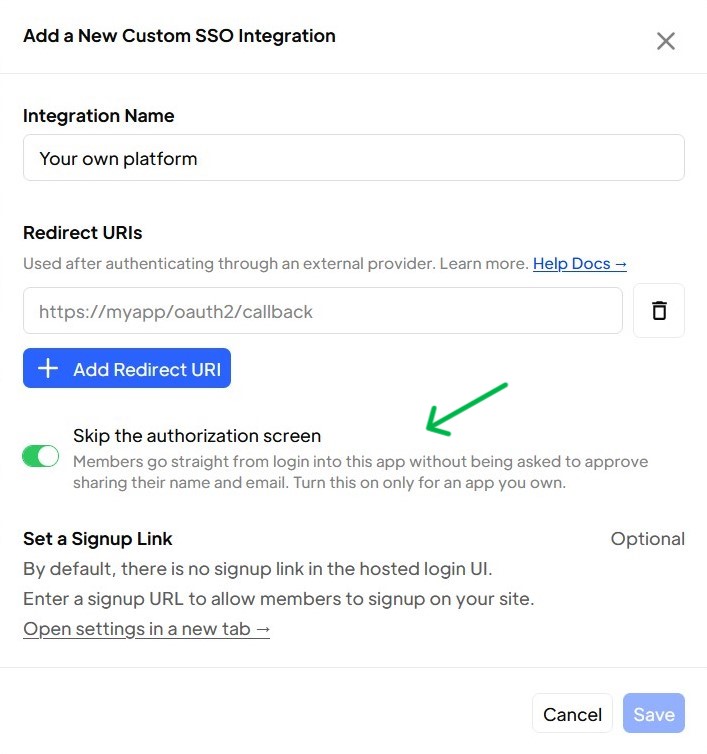
If you are setting up Custom SSO via Memberstack to connect to another platform that you own (maybe your own internal tool), you now have the ability to "Skip the authorization screen" while setting up that SSO integration.
This will let your users to login to your platform without an additional step to authorize sharing the profile data as it's all within your own company.
But in case you are setting up custom SSO for a 3rd party tool via Memberstack, then the toggle should remain off.
Hope this helps.
Please sign in to leave a comment.